See how work meets human capacity.

Synapse joins your work signals with consented human state to show what AI is really doing to delivery and focus, without ever naming, ranking or exposing a person.

TEAM VIEWS · AGGREGATES ONLYCONSENT · MANDATORY, REVOCABLERAW SENSOR DATA · STAYS ON DEVICERANKINGS · NONE, EVER
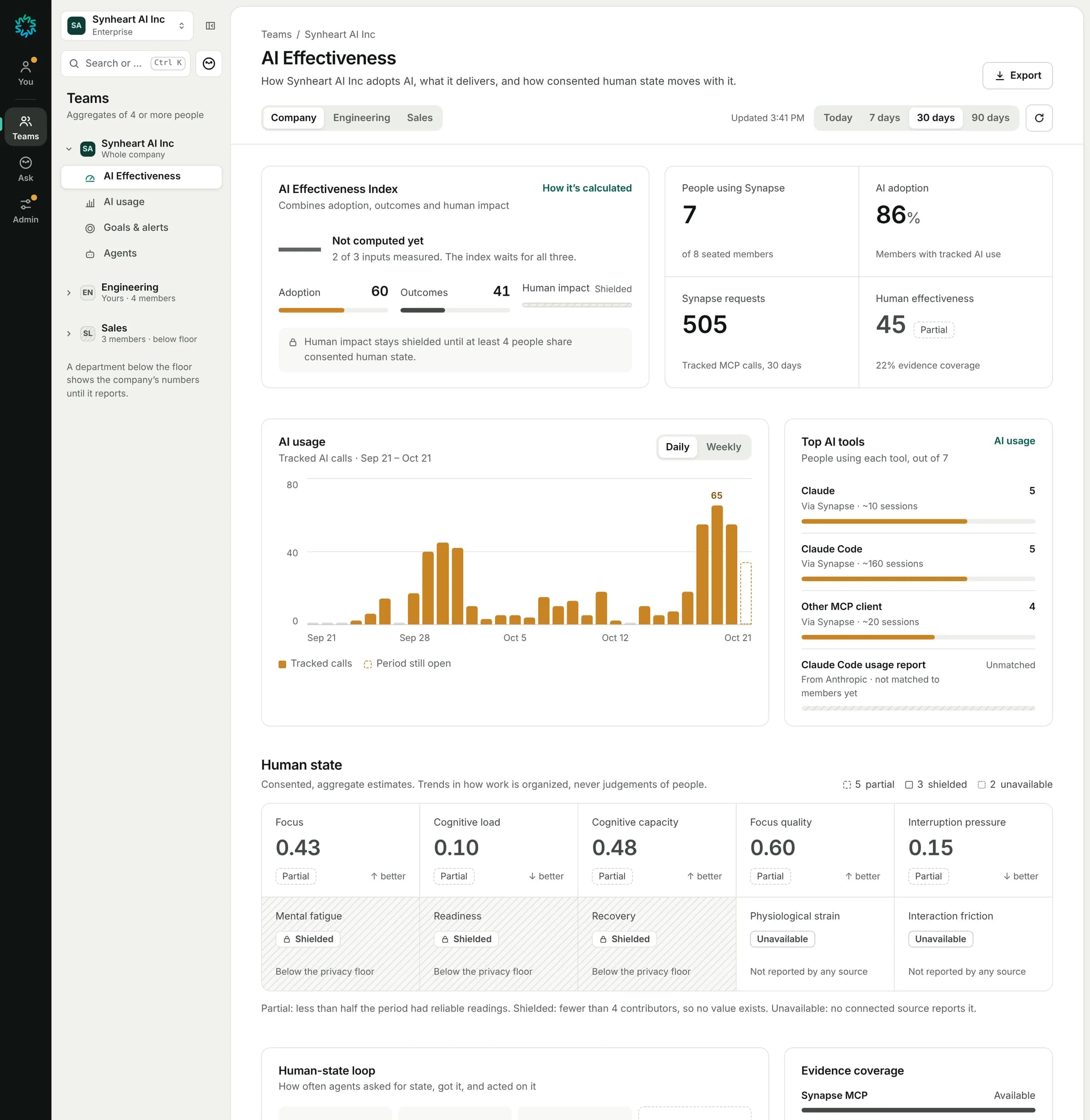
Synapse AI Effectiveness dashboard: index, people using Synapse, AI adoption, AI usage, top AI tools and human state

Reads work signals and AI usage from the tools your team already runs on

GitHubLinearSlackNotionMicrosoft 365JiraGitLabClaude CodeCursorGitHub CopilotChatGPT
01 / Two views

Two views. One honest system.

Engineers get private insight into their own flow and focus. Leaders get the team picture as aggregates. Nobody gets a view of anyone else.

FOR ENGINEERS · ONLY YOU CAN SEE THIS

Your week, in your hands.

Flow availability, focus fragmentation, meeting load and when you focus best, plus how your hours with AI compare to the hours without it.
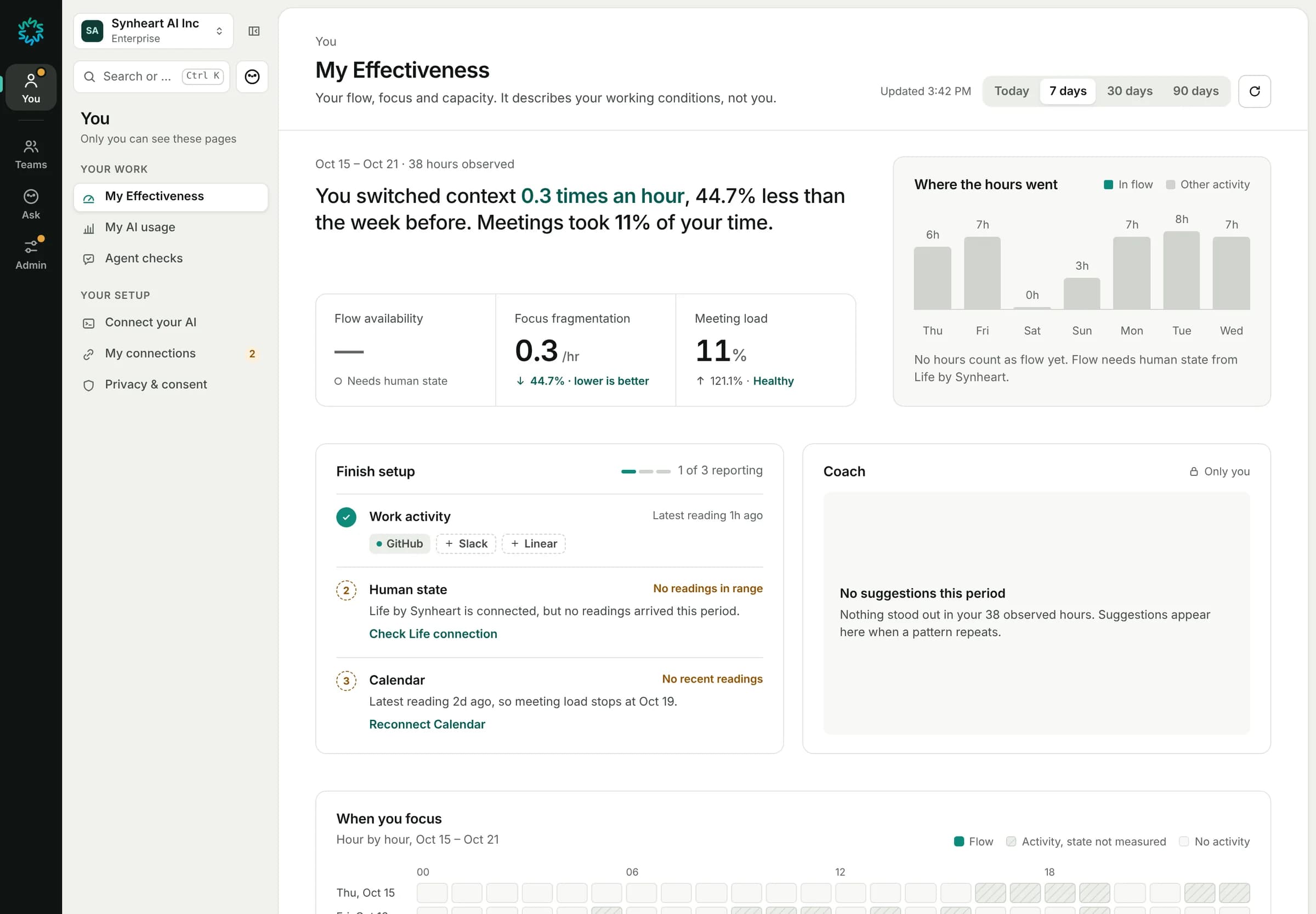
My Effectiveness: context switches, flow availability, focus fragmentation and meeting load
FOR LEADERS · AGGREGATES ABOVE THE PRIVACY FLOOR

The team picture, without the surveillance.

AI adoption, delivery outcomes, AI spend and consented human-state alignment, combined into one AI Effectiveness Index that refuses to guess.

AI Effectiveness: index, people using Synapse, AI adoption and AI usage chart
02 / Knowledge & agents

Your team’s memory, working for every agent.

Synapse turns decisions, docs and code history into memory your agents check before they act, and holds them to the rules your team sets.

Synaptic Mesh

People, repositories, pull requests, issues and documents as one living graph. Restricted documents appear as locked, masked nodes.

yousynapse-websynheart-platformsynheart-landinglife-desktop-apprfc-ai-effectiveness.mdrestricted
PersonCommitsPull requestIssueDocument

Agents held to team rules

Guard rules stop an action. Ask rules pause it for a person. Counts are per rule and never name a member.

Blocked actions
40
Approval requests
155
RuleStoppedAsked
guard.protect-hooks280
ask-rm-recursive061
guard.no-self-authorize50
ask-read-secrets was approved 26 of 26 times. It may no longer need a person.

Search with citations

Ask what the organization knows. The answer is the evidence, each excerpt linked to its source.

What is our privacy floor?
SYRFC: AI Effectiveness · Memory
“Every team figure is an aggregate over at least this many contributing people… The default is 10; it can never go below 4.”
NPrivacy promise · Notion
Masked: you can’t read this at its source

Connect your AI over MCP

OAuth 2.1 with PKCE. Drive, OneDrive and Notion documents reach an agent only if its person can open them at the source.

# Install the Synheart CLI$curl -fsSL https://synheart.sh/install | sh
# Sign in and connect every agent it finds$synheart synapse setup

Goals & alerts

Set targets on team metrics. Synapse checks hourly and posts to Slack when a line is crossed.

Deep-work availabilityOn track
Company · last 7 daysTarget · at least 60%
Meeting load above 30%Engineering · posts to #eng-leads
03 / Honest data

A missing number is information.

Every figure is drawn as exactly one of five states. Gaps are never drawn as zero, nothing is estimated, and each absence says why it’s missing and how to fix it.

STATE 1Measured0.43Solid figure, solid stroke. Enough reliable readings across the period.
STATE 2Partial0.48Muted figure, dashed stroke. Under half the period had reliable readings.
STATE 3ShieldedBelow floorHatched field and a lock. Too few contributors, so no value exists.
STATE 4Unmeasured—Em dash, broken line. No readings in range, and a gap is never zero.
STATE 5UnavailableConnect deploy events →Dotted outline, with the fix inline. The source or its setup is missing.
04 / Privacy by construction

Measure the system. Never the person.

Below the floor, Synapse won’t even say how many people contributed, because a count would expose who chose not to.

k=10The default minimum group size for any team figure. Admins can adjust it, but never below 4.
01
Aggregate onlyEvery team figure needs enough contributors to clear the privacy floor. Smaller groups are withheld, never estimated.
02
Consent is yoursHuman state is collected only with explicit consent through Life by Synheart, and you can withdraw it at any time.
03
Raw sensor data stays on deviceLife sends Synapse state scores worked out on your device, never raw sensor readings. Prompts and completions are never stored.
04
No one is rankedThere is no per-person metric view, ranking or drill-down. Not for leads, not for admins.
How privacy works
Google Workspace

What Synapse reads from Google, and why.

Connecting Google is optional and done by each member with their own account. Synapse only reads; it never creates, changes, shares or deletes anything in Google.

Google Drive

drive.readonly
WHAT IT READS
The names, links and text of Google Docs, Google Slides, plain-text and Markdown files, only in shared drives your administrator adds. My Drive is never included.
WHY
So your team can search them in Synapse and from the AI tools you connect. A file is shown only to members who can open it in Google Drive.

Google Calendar

calendar.readonly
WHAT IT READS
The start and end times, status and type of your own events, such as declined or out of office. Never titles, descriptions, attendees or locations.
WHY
To compute your meeting load, which only you can see.

Google account

openid, email
WHAT IT READS
Your Google account email and ID.
WHY
To confirm which Google account is yours, so your activity and meetings are attributed to you.

Synapse’s use and transfer of information received from Google APIs adheres to the Google API Services User Data Policy, including the Limited Use requirements. Google data is never sold, used for advertising or used to train generalized AI models. Read the details in our privacy policy.

05 / Setup

Live in an afternoon.

  1. 1Connect your toolsAn admin connects GitHub, Slack, Notion and Microsoft 365. Each connector lists exactly what it reads and what it never reads.
  2. 2Members opt inEngineers connect Life by Synheart to share human-state scores. Connecting is their choice, and disconnecting stops it at once.
  3. 3See it, and give agents memoryLeaders see aggregates above the floor, engineers see their own week, and agents get team memory over MCP.
06 / Pricing

Priced per seat, with real usage included.

Every seat comes with a monthly allowance. Overage is billed at published rates, so the bill is as readable as the dashboard.

See pricing
25,000
MCP tool calls per seat, monthly
15,000
Effectiveness reads per seat, monthly
2,500
Premium MCP calls per seat, monthly
10B
Embedding tokens per organization
07 / FAQ

Questions teams ask first.

Can my manager see my individual numbers?

No. My Effectiveness and your agent decisions are visible only to you, admins included. Team pages show aggregates above the privacy floor (10 people by default, never fewer than 4) and never name, rank or drill into a person.

What does Synapse read from our tools?

Activity and timing: commits, pull requests and reviews, issue titles and state changes, calendar event times and AI usage counts, plus the text of documents and channels you choose as memory. Never issue descriptions, prompts or completions. Code search reads repositories live and stores nothing.

What happens when a team is below the privacy floor?

Its figures are withheld, and the page shows the parent’s numbers with a banner saying so. A small team can still see its own view if every member opts in, and it disappears the moment anyone opts out.

Which AI tools does it work with?

Claude, Claude Code, Cursor and any client that supports remote MCP connect directly. Usage reports from Claude Code, GitHub Copilot and other AI tools come in through Connectors.

Can an agent read everything in our memory?

Documents from Google Drive, OneDrive and Notion reach an agent only if its signed-in person can open them at the source, checked again on every request. Slack channels and repositories your admins choose as team memory are shared across the organization.

Set up your team in one command.

# Install the Synheart CLI$curl -fsSL https://synheart.sh/install | sh
# Sign in and connect your agents$synheart synapse setup
✓ Signed in with your work account✓ Found Claude Code, Cursor? Turn on token telemetry? (y/N)